EARLY BIRD SALE ENDS DECEMBER 31, 2026
SEOT Brain
Early Bird Alpha Access
Your TPT data system, already built and maintained
All of Mike’s tools… with the power of AI… saved on your computer.
See what’s working in your TPT store, keep your data organized, and decide what to work on next.
$300 USD for your first year
(Renews at $444 USD/year)
Includes a 60-minute private onboarding and strategy call with Mike (regular $500 value).
Get another 60 Mike Minutes with each paid annual renewal.
Get PRO tools (without the community)
Alpha software is available now. Introductory pricing ends December 31, 2026. 14 days no risk refund policy.
SEOT BRAIN · EARLY BIRD ALPHA ACCESS
One TPT data system.
One hour with Mike.
A year of updates.
The introductory first-year price increases on January 1, 2027. Start now and use Brain while I continue improving it.
What your first year includes
$300 USD
First year: $300 USD. Annual renewals: $444 USD.
- 12 months of SEOT Brain access, including software updates released during your active subscription.
- A private 60-minute onboarding and strategy consultation with Mike (regular consulting rate: $500/hour).
- Another 60 Mike Minutes for a private call with each paid annual renewal at $444 USD/year.
- A 14-day refund period beginning after your onboarding call, so you can try Brain before deciding whether to keep it.
Early Bird deadline: December 31, 2026. The introductory first-year price increases January 1, 2027.
Choose how you access Brain
PRO Membership: SEOT Brain, PRO tools, and the TPT seller community.
PRO Tools: Access Brain and the tools without the community.
OFF-THE-GRID: Prefer this option? Email Mike to arrange access.
Already paying for PRO Membership or PRO Tools? Brain is already included. You do not need to buy it again.
Get PRO tools (without the community)
This is an annual subscription. It renews at $444 USD/year unless canceled. Each paid renewal includes another 60 Mike Minutes. Alpha software has bugs and limited training materials. A compatible AI coding tool (Claude Cowork / ChatGPT Codex) and GitHub account are required for setup; AI subscriptions are separate.
Early Bird pricing ends December 31, 2026
Get SEOT Brain in alpha now for $300 USD in your first year. The introductory first-year price increases on January 1, 2027. Your annual renewal is $444 USD.
Early access, with a real human (Mike) to help you
SEOT Brain is working software in alpha, not a finished product.
You should be comfortable with computers and patient with bugs, rough edges, and limited training videos.
Your purchase includes a private one-hour onboarding and strategy call with Mike.
If Brain is not for you, the 14-day refund period begins after that call.
List of Game Changers
(so far…)
Game Changer #2
How can I compare groups of products (Year Over Year)
I made a product and then I made a bundle. The sales of the original product went down (I think because they’re going to the bundle.)
Here’s how you can tell if you’re making more money overall
Game Changer #3
What should I make next?
Follow the money. Make more of what works. Stop making products that don’t sell.
Game Changer #4
Where are my buyers from?
Is there a way to see what states are buying a single product? Where should I run Facebook Ads?

What do people buy before and after they buy this resource?
Use this information to figure out what to upsell in a resource.
Where are your buyers?
Use this information to target your Facebook Ads or product descriptions.


Which products sold well in August / September of last year.
Click on the number of products to instantly see what you need to fix on each of those products.
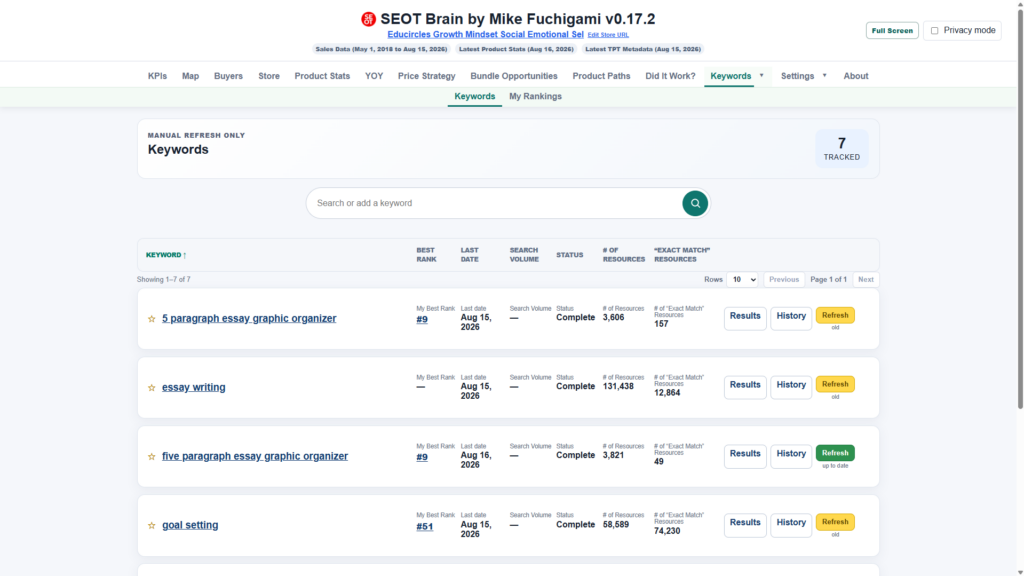
Where do I rank for keywords
SEOT brain can visit TPT on your behalf to see where you rank for specific keywords.
We go at human speed so we don’t overload the TPT servers.
Which products sold well in August / September of last year.
Click on the number of products to instantly see what you need to fix on each of those products.
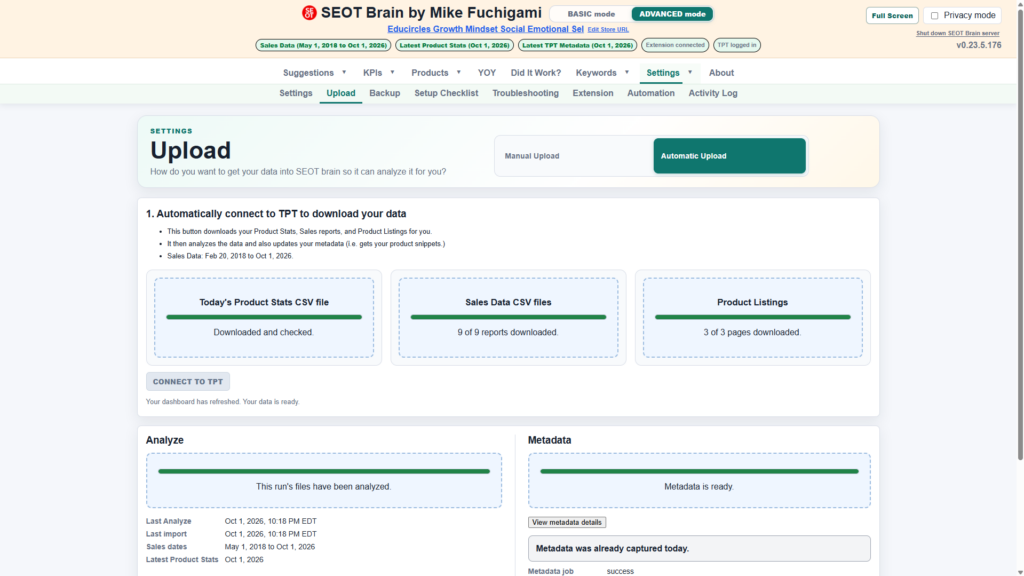
One-click button to get your data from TPT
In “Automatic upload” mode, click the “Connect to TPT” button to get the following files:
- Product Stats CSV
- Sales Data CSV
- Product Listing HTML
You can do this daily, weekly, monthly, or quarterly. Easy.
FEATURES & BENEFITS
Questions SEOT Brain helps you answer
Point it at the reports you already download from TPT. SEOT Brain reads them and answers the questions you actually care about.
How are my earnings trending?
Monthly earnings, orders, and buyers over time, with month-by-month heatmaps.
How many buyers come back?
Your repeat-buyer rate and the share of earnings that comes from returning buyers.
Where are my buyers?
A buyer map by country, state, province, and city — ranked by earnings.
Which listings get views but don’t sell?
Page views, previews, and conversion for every product, side by side.
Which products should I update first?
Earnings per week against product age, so you fix what moves the needle.
What should I bundle?
Products often bought together, from real same-order evidence.
How does this year compare to last?
Year-over-year on views, units, conversion, and earnings.
Did my change actually help?
“Did It Work?” compares a title, cover, price, or preview change across four matched periods.
What did I try, and what happened?
The SEOT journal links dated Strategy, Effort, Optimize, and Tinker notes to your products.
HOW IT WORKS
From your TPT files to real answers
1 · Add your TPT files
Drop your Sales and Product Stats CSV files into the inbox.
2 · Load your dashboard
SEOT Brain loads them into a private local database and builds your dashboard.
3 · Ask your questions
Explore the SEOT brain dashboard, or ask in plain English (using Claude Cowork or ChatGPT Codex)
PRIVACY BY DESIGN
Your data stays on your computer
SEOT Brain is local-first. Your CSVs, your database, and your dashboard live on your machine. Buyer names and locations are never uploaded. Privacy mode turns dollar amounts into percentage shares when you want to share your screen.
Runs on your computer
The dashboard reads a local database through a local server.
Nothing is uploaded
Buyer names and location details never leave your machine (unless you use AI to analyze SEOT brain data)
Privacy mode for sharing
Turn dollar amounts into percentage shares before you share your screen.
WORKS WITH YOUR AI TOOLS
Ask it in plain English
Because your numbers sit in an open local database, you can pair SEOT Brain with Codex or Claude Code and ask real questions about your store — and get an answer with the numbers behind it.
Ask things like:
- “Which products bring in new buyers?”
- “Am I creating super fans that come back for more?”
- “Which listings should I refresh first?”
- “Which products should I bundle together or upsell?”
SEOT Brain is available now — $300 Early Bird Alpha
Your first year is $300 USD, with Brain updates and a private 60-minute onboarding and strategy call. The first-year price increases January 1, 2027; renewals are $444 USD/year and include another 60 Mike Minutes.
Get PRO tools (without the community)
Alpha software is available now. Introductory pricing ends December 31, 2026. Refund requests are accepted within 14 days after your onboarding call.
Why do I need SEOT Brain
if I have AI?
AI can analyze TPT data.
SEOT Brain helps keep your data ready to use, month after month.
Do you want to spend your AI time building a TPT analytics system,
or using one to make better business decisions?
Why use SEOT Brain alongside AI?
The question isn’t why do I need SEOT brain if I use AI…
The question is how can SEOT brain help AI produce better results?
Three ways to work with your TPT data
All three options can work. The difference is how much setup, data work, and upkeep you want to handle.
|
What you want to do |
SEOT Brain |
AI |
SEOT Brain |
|---|---|---|---|
|
Get TPT data |
One-click collection with the paired Extension, after setup. |
Import CSVs yourself or build your own collection tools. |
Brain collects and checks the files. |
|
Connect your files |
Matches products and handles overlap in Sales exports. |
Can connect the files using code and rules you set up and check. |
Brain prepares the data; |
|
Keep your history |
Stores the sales, stats, keywords, and changes you’ve collected. |
Can save files or build a database if you set that up. |
Brain keeps the history; |
|
See regular reports |
Open ready-made dashboards. No prompt needed. |
Ask AI to create reports or reuse saved scripts. |
Use Brain dashboards, then ask AI what stands out. |
|
Ask new questions |
Limited to built-in reports and views. |
Flexible, with the right files and tools. |
Explore Brain reports or use supported local read-only access. |
|
Use AI allowance |
Core reports and calculations use no AI tokens. |
AI tasks use your model allowance. |
Brain’s regular reports use none; AI questions still do. |
|
Handle updates |
I work on Brain updates as TPT changes. You install them. |
You maintain the scripts and workflows you build. |
I maintain Brain; you maintain any custom AI workflow. |
|
Best for |
Ongoing TPT tracking and repeatable reports. |
One-off analysis and custom automation. |
Prepared TPT data, deeper questions, and action plans. |
Ready to start using your TPT data?
SEOT Brain Early Bird: $300 USD in your first year, renewing at $444 USD/year. A private 60-minute onboarding call is included, plus another hour with Mike at each paid annual renewal. The 14-day refund window begins after your initial onboarding call.
Get PRO tools (without the community)
A quick note: One-click collection needs the paired SEOT Extension and Advanced mode. SEOT Brain does not use AI tokens; however, you may need to use AI tokens to install or update SEOT Brain.
Questions
Are you part of the PRO community? Ask your question here.
Otherwise, email [email protected]